![94682b08-af4e-42f2-b868-af7439511c70.jpg]](https://support.growdata.com.au/hs-fs/hubfs/94682b08-af4e-42f2-b868-af7439511c70.jpg?height=50&name=94682b08-af4e-42f2-b868-af7439511c70.jpg)
Here you can include any business that provides chemicals or transport, as well as pickers and seasonal employees.
- Navigate to 'Farm Setup' through the menu to the left of the screen.
If this is not displayed on screen, it can be accessed through the menu icon ( ) in the top left corner of the dashboard.
 - Select 'Suppliers' tab within the farm setup dashboard
- Select 'Create Supplier'
- Enter all details pertaining to the supplier:
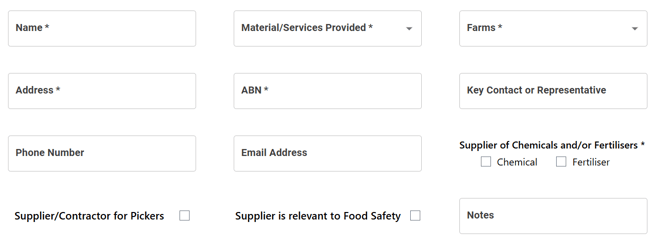
- If they are a harvest contractor, select 'Supplier/Contractor for Pickers'
- There is an option to add a Certificate of Compliance if 'Supplier is relevant to Food Safety' is ticked
- 'Submit'
Remove Supplier
To remove a supplier, locate them in the list, select 'More' > 'Discontinue'. All discontinued suppliers will appear in a separate tab and can be reactivated.