- Navigate to 'Farm Setup' through the menu to the left of the screen.
If this is not displayed on the screen, it can be accessed through the menu icon ( ) in the top left corner of the dashboard.
 - Select 'Chemicals'
- To add a new chemical, select 'Create Chemical' (please note: crops must have been created before proceeding in order to add application rates)
- Enter chemical details:
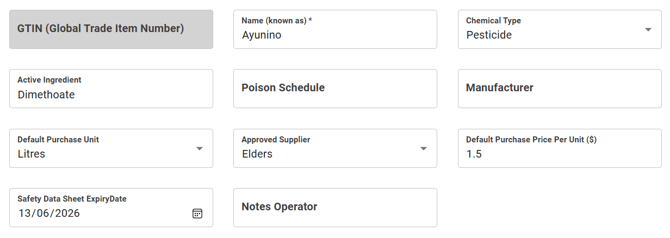
- Recommended to add default purchase price per unit to track costs associated with each application
- Scroll down, and select 'Add Rates and Regulatory Info'
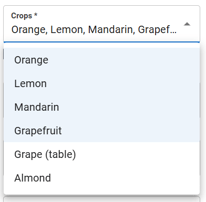 Rate information (e.g. application rate, max rate, withholding, etc.) can either be entered for all crops on the farm, or individualised based on each crop.
To apply rate info to all crops, tick 'all crops'. Otherwise, individual crops/a group of crops can be selected (e.g. all citrus selected)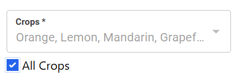
- Once relevant crops have been chosen, enter rate info:
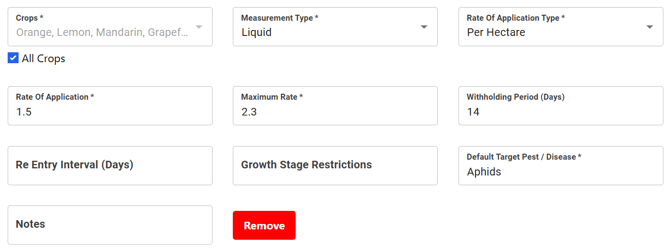
- Repeat steps 4-7 for each crop/rate if required
- Once all relevant rates have been entered, select 'Submit' to finalise chemical entry
- Repeat for all chemicals used on farm
English
![94682b08-af4e-42f2-b868-af7439511c70.jpg]](https://support.growdata.com.au/hs-fs/hubfs/94682b08-af4e-42f2-b868-af7439511c70.jpg?height=50&name=94682b08-af4e-42f2-b868-af7439511c70.jpg)