![94682b08-af4e-42f2-b868-af7439511c70.jpg]](https://support.growdata.com.au/hs-fs/hubfs/94682b08-af4e-42f2-b868-af7439511c70.jpg?height=50&name=94682b08-af4e-42f2-b868-af7439511c70.jpg)
If you need to shift chemical stock between sheds on farm or between farms, create a transfer record.
-
Navigate to the menu, and select 'Inventory Management' > 'Transfer Records'
-
Select 'Create New Transfer Record'
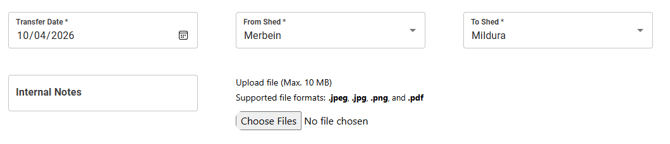
- Enter transfer date and which shed chemical is to be deducted from and added to. Option to add any files required
- Select 'Add Item'
- Enter chemical details
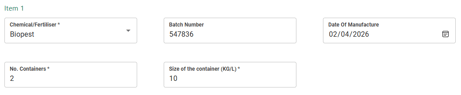
- Chemical
- Batch number
- D.O.M
- Number of containers
- Size of containers
- Repeat for any additional chemicals
- Once all entered, select 'Save & Transfer Stock' to finalise
- The transfer record will now appear on the list
- If you need to cancel the transfer, locate on the menu, select 'more' and 'void'. It will now be removed from the list but still available to view in 'Voided Records'